 Marc Mintel
5397309103
Marc Mintel
5397309103
Some checks failed
Build & Deploy / 🔍 Prepare (push) Successful in 20s
Build & Deploy / 🧪 QA (push) Failing after 34s
Build & Deploy / 🏗️ Build (push) Has started running
Build & Deploy / 🚀 Deploy (push) Has been cancelled
Build & Deploy / 🧪 Smoke Test (push) Has been cancelled
Build & Deploy / ⚡ Lighthouse (push) Has been cancelled
Build & Deploy / 🔔 Notify (push) Has been cancelled
256 lines
14 KiB
Plaintext
256 lines
14 KiB
Plaintext
<p align="center">
|
|
<a href="https://sentry.io/?utm_source=github&utm_medium=logo" target="_blank">
|
|
<img src="https://sentry-brand.storage.googleapis.com/sentry-wordmark-dark-280x84.png" alt="Sentry" width="280" height="84">
|
|
</a>
|
|
</p>
|
|
|
|
# Sentry Session Replay
|
|
|
|
[](https://www.npmjs.com/package/@sentry-internal/replay)
|
|
[](https://www.npmjs.com/package/@sentry-internal/replay)
|
|
[](https://www.npmjs.com/package/@sentry-internal/replay)
|
|
|
|
This is an internal package that is being re-exported in `@sentry/browser` and other browser-related SDKs like
|
|
`@sentry/react` or `@sentry/vue`.
|
|
|
|
## Pre-requisites
|
|
|
|
`@sentry-internal/replay` requires Node 14+, and browsers newer than IE11.
|
|
|
|
## Installation
|
|
|
|
Replay can be imported from `@sentry/browser`, or a respective SDK package like `@sentry/react` or `@sentry/vue`. You
|
|
don't need to install anything in order to use Session Replay. The minimum version that includes Replay is 7.27.0.
|
|
|
|
For details on using Replay when using Sentry via the CDN bundles, see [CDN bundle](#loading-replay-as-a-cdn-bundle).
|
|
|
|
## Setup
|
|
|
|
To set up the integration, add the following to your Sentry initialization. Several options are supported and passable
|
|
via the integration constructor. See the [configuration section](#configuration) below for more details.
|
|
|
|
```javascript
|
|
import * as Sentry from '@sentry/browser';
|
|
// or e.g. import * as Sentry from '@sentry/react';
|
|
|
|
Sentry.init({
|
|
dsn: '__DSN__',
|
|
|
|
// This sets the sample rate to be 10%. You may want this to be 100% while
|
|
// in development and sample at a lower rate in production
|
|
replaysSessionSampleRate: 0.1,
|
|
|
|
// If the entire session is not sampled, use the below sample rate to sample
|
|
// sessions when an error occurs.
|
|
replaysOnErrorSampleRate: 1.0,
|
|
|
|
integrations: [
|
|
Sentry.replayIntegration({
|
|
// Additional SDK configuration goes in here, for example:
|
|
maskAllText: true,
|
|
blockAllMedia: true,
|
|
// See below for all available options
|
|
}),
|
|
],
|
|
// ...
|
|
});
|
|
```
|
|
|
|
### Lazy loading Replay
|
|
|
|
Replay will start automatically when you add the integration. If you do not want to start Replay immediately (e.g. if
|
|
you want to lazy-load it), you can also use `addIntegration` to load it later:
|
|
|
|
```js
|
|
import * as Sentry from "@sentry/react";
|
|
import { BrowserClient } from "@sentry/browser";
|
|
|
|
Sentry.init({
|
|
// Do not load it initially
|
|
integrations: []
|
|
});
|
|
|
|
// Sometime later
|
|
const { Replay } = await import('@sentry/browser');
|
|
const client = Sentry.getClient<BrowserClient>();
|
|
|
|
// Client can be undefined
|
|
client?.addIntegration(Sentry.replayIntegration());
|
|
```
|
|
|
|
### Identifying Users
|
|
|
|
If you have only followed the above instructions to setup session replays, you will only see IP addresses in Sentry's
|
|
UI. In order to associate a user identity to a session replay, use
|
|
[`setUser`](https://docs.sentry.io/platforms/javascript/enriching-events/identify-user/).
|
|
|
|
```javascript
|
|
import * as Sentry from '@sentry/browser';
|
|
|
|
Sentry.setUser({ email: 'jane.doe@example.com' });
|
|
```
|
|
|
|
### Stopping & starting Replays manually
|
|
|
|
Replay recording only starts when it is included in the `integrations` array when calling `Sentry.init` or calling
|
|
`addIntegration` from the a Sentry client instance. To stop recording you can call `stop()`.
|
|
|
|
```js
|
|
import * as Sentry from "@sentry/react";
|
|
import { BrowserClient } from "@sentry/browser";
|
|
|
|
const replay = Sentry.replayIntegration();
|
|
|
|
Sentry.init({
|
|
integrations: [replay]
|
|
});
|
|
|
|
const client = Sentry.getClient<BrowserClient>();
|
|
|
|
// Add replay integration, will start recording
|
|
client?.addIntegration(replay);
|
|
|
|
// Stop recording
|
|
replay.stop();
|
|
```
|
|
|
|
When both `replaysSessionSampleRate` and `replaysOnErrorSampleRate` are `0`, recording will _not_ start. In this case,
|
|
you can manually start recording:
|
|
|
|
```js
|
|
replay.start(); // Will start a session in "session" mode, regardless of sample rates
|
|
replay.startBuffering(); // Will start a session in "buffer" mode, regardless of sample rates
|
|
```
|
|
|
|
## Loading Replay as a CDN Bundle
|
|
|
|
As an alternative to the NPM package, you can use Replay as a CDN bundle. Please refer to the
|
|
[Session Replay installation guide](https://docs.sentry.io/platforms/javascript/session-replay/#install) for CDN bundle
|
|
instructions.
|
|
|
|
<details>
|
|
<summary>Deprecated Replay integration bundle</summary>
|
|
Installing the replay integration as a secondary integration bundle to the SDK bundle was deprecated in favour of
|
|
complete CDN bundles that already contain the replay integration. No need to keep two bundles in sync anymore.
|
|
The `replay.(min.)js` bundle will be removed in v8 of the JS SDKs.
|
|
|
|
```html
|
|
<script src="https://browser.sentry-cdn.com/7.41.0/bundle.min.js" crossorigin="anonymous"></script>
|
|
<script src="https://browser.sentry-cdn.com/7.41.0/replay.min.js" crossorigin="anonymous"></script>
|
|
```
|
|
|
|
</details>
|
|
|
|
## Sessions
|
|
|
|
A session starts when the Session Replay SDK is first loaded and initialized. The session will continue until 5 minutes
|
|
passes without any user interactions[^1] with the application _OR_ until a maximum of 30 minutes have elapsed. Closing
|
|
the browser tab will end the session immediately according to the rules for
|
|
[SessionStorage](https://developer.mozilla.org/en-US/docs/Web/API/Window/sessionStorage).
|
|
|
|
[^1]: An 'interaction' refers to either a mouse click or a browser navigation event.
|
|
|
|
### Accessing the Replay Session ID
|
|
|
|
You can get the ID of the currently running session via `replay.getReplayId()`. This will return `undefined` if no
|
|
session is ongoing.
|
|
|
|
### Replay Captures Only on Errors
|
|
|
|
Alternatively, rather than recording an entire session, you can capture a replay only when an error occurs. In this
|
|
case, the integration will buffer up to one minute worth of events prior to the error being thrown. It will continue to
|
|
record the session following the rules above regarding session life and activity. Read the [sampling](#Sampling) section
|
|
for configuration options.
|
|
|
|
## Sampling
|
|
|
|
Sampling allows you to control how much of your website's traffic will result in a Session Replay. There are two sample
|
|
rates you can adjust to get the replays more relevant to your interests:
|
|
|
|
- `replaysSessionSampleRate` - The sample rate for replays that begin recording immediately and last the entirety of the
|
|
user's session.
|
|
- `replaysOnErrorSampleRate` - The sample rate for replays that are recorded when an error happens. This type of replay
|
|
will record up to a minute of events prior to the error and continue recording until the session ends.
|
|
|
|
When Replay is initialized, we check the `replaysSessionSampleRate`. If it is sampled, then we start recording & sending
|
|
Replay data immediately. Else, if `replaysOnErrorSampleRate > 0`, we'll start recording in buffering mode. In this mode,
|
|
whenever an error occurs we'll check `replaysOnErrorSampleRate`. If it is sampled, when we'll upload the Replay to
|
|
Sentry and continue recording normally.
|
|
|
|
## Configuration
|
|
|
|
### SDK Configuration
|
|
|
|
The following options can be configured on the root level of your browser-based Sentry SDK, in `init({})`:
|
|
|
|
| key | type | default | description |
|
|
| ------------------------ | ------ | ------- | --------------------------------------------------------------------------------------------------------------------------------------------------------------------------------------------------------------------------------------------------------------- |
|
|
| replaysSessionSampleRate | number | `0` | The sample rate for replays that begin recording immediately and last the entirety of the user's session. 1.0 will collect all replays, 0 will collect no replays. |
|
|
| replaysOnErrorSampleRate | number | `0` | The sample rate for replays that are recorded when an error happens. This type of replay will record up to a minute of events prior to the error and continue recording until the session ends. 1.0 capturing all sessions with an error, and 0 capturing none. |
|
|
|
|
### General Integration Configuration
|
|
|
|
The following options can be configured as options to the integration, in `Sentry.replayIntegration({})`:
|
|
|
|
| key | type | default | description |
|
|
| ------------- | ------- | ------- | --------------------------------------------------------------------------------------------------------------------------------------------------------------------------------- |
|
|
| stickySession | boolean | `true` | Keep track of the user across page loads. Note a single user using multiple tabs will result in multiple sessions. Closing a tab will result in the session being closed as well. |
|
|
|
|
### Privacy Configuration
|
|
|
|
The following options can be configured as options to the integration, in `Sentry.replayIntegration({})`:
|
|
|
|
| key | type | default | description |
|
|
| ------------- | ------------------------ | -------------------------------------- | -------------------------------------------------------------------------------------------------------------------------------------------- |
|
|
| maskAllText | boolean | `true` | Mask _all_ text content. Will pass text content through `maskFn` before sending to server. |
|
|
| maskAllInputs | boolean | `true` | Mask values of `<input>` elements. Passes input values through `maskInputFn` before sending to server. |
|
|
| blockAllMedia | boolean | `true` | Block _all_ media elements (`img, svg, video, object, picture, embed, map, audio`) |
|
|
| maskFn | (text: string) => string | `(text) => '*'.repeat(text.length)` | Function to customize how text content is masked before sending to server. By default, masks text with `*`. |
|
|
| block | Array<string> | `.sentry-block, [data-sentry-block]` | Redact any elements that match the DOM selectors. See [privacy](#blocking) section for an example. |
|
|
| unblock | Array<string> | [] | Do not redact any elements that match the DOM selectors. Useful when using `blockAllMedia`. See [privacy](#blocking) section for an example. |
|
|
| mask | Array<string> | `.sentry-mask, [data-sentry-mask]` | Mask all elements that match the given DOM selectors. See [privacy](#masking) section for an example. |
|
|
| unmask | Array<string> | [] | Unmask all elements that match the given DOM selectors. Useful when using `maskAllText`. See [privacy](#masking) section for an example. |
|
|
| ignore | Array<string> | `.sentry-ignore, [data-sentry-ignore]` | Ignores all events on the matching input fields. See [privacy](#ignoring) section for an example. |
|
|
|
|
## Privacy
|
|
|
|
There are several ways to deal with PII. By default, the integration will mask all text content with `*` and block all
|
|
media elements (`img, svg, video, object, picture, embed, map, audio`). This can be disabled by setting `maskAllText` to
|
|
`false`. It is also possible to add the following CSS classes to specific DOM elements to prevent recording its
|
|
contents: `sentry-block`, `sentry-ignore`, and `sentry-mask`. The following sections will show examples of how content
|
|
is handled by the differing methods.
|
|
|
|
### Masking
|
|
|
|
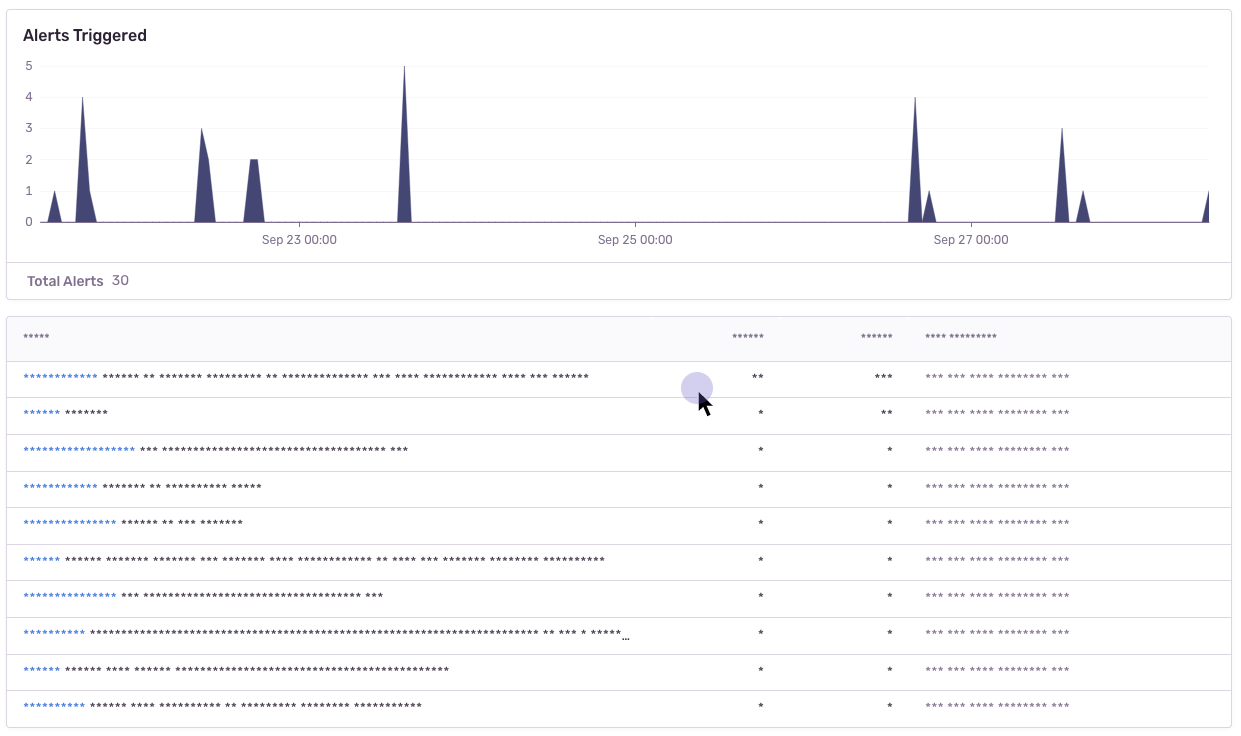
Masking replaces the text content with something else. The default masking behavior is to replace each character with a
|
|
`*`. In this example the relevant html code is: `<table class="sentry-mask">...</table>`.
|
|
|
|
|
|
### Blocking
|
|
|
|
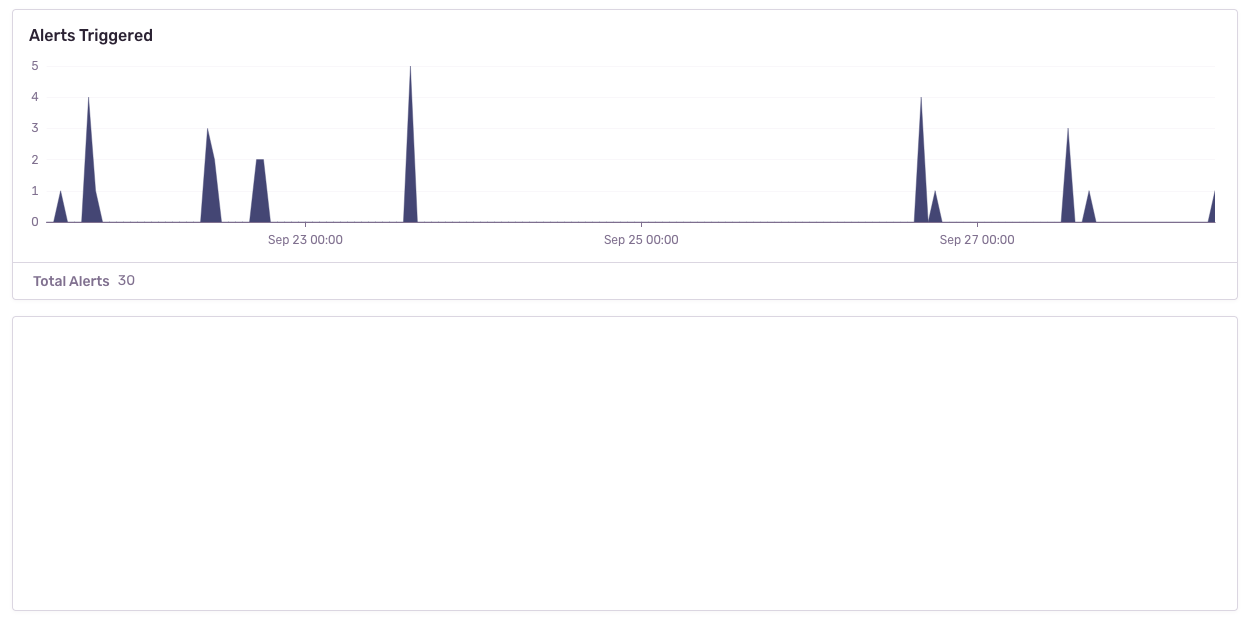
Blocking replaces the element with a placeholder that has the same dimensions. The recording will show an empty space
|
|
where the content was. In this example the relevant html code is: `<table data-sentry-block>...</table>`.
|
|
|
|
|
|
### Ignoring
|
|
|
|
Ignoring only applies to form inputs. Events will be ignored on the input element so that the replay does not show what
|
|
occurs inside of the input. In the below example, notice how the results in the table below the input changes, but no
|
|
text is visible in the input.
|
|
|
|
https://user-images.githubusercontent.com/79684/192815134-a6451c3f-d3cb-455f-a699-7c3fe04d0a2e.mov
|
|
|
|
## Error Linking
|
|
|
|
Currently, errors that happen on the page while a replay is running are linked to the Replay, making it as easy as
|
|
possible to jump between related issues/replays. However, please note that it is _possible_ that the error count
|
|
reported on the Replay Detail page does not match the actual errors that have been captured. The reason for that is that
|
|
errors _can_ be lost, e.g. a network request fails, or similar. This should not happen to often, but be aware that it is
|
|
theoretically possible.
|
|
|
|
## Manually sending replay data
|
|
|
|
You can use `replay.flush()` to immediately send all currently captured replay data. When Replay is currently in
|
|
buffering mode, this will send up to the last 60 seconds of replay data, and also continue sending afterwards, similar
|
|
to when an error happens & is recorded.
|