 Marc Mintel
5397309103
Marc Mintel
5397309103
Some checks failed
Build & Deploy / 🔍 Prepare (push) Successful in 20s
Build & Deploy / 🧪 QA (push) Failing after 34s
Build & Deploy / 🏗️ Build (push) Has started running
Build & Deploy / 🚀 Deploy (push) Has been cancelled
Build & Deploy / 🧪 Smoke Test (push) Has been cancelled
Build & Deploy / ⚡ Lighthouse (push) Has been cancelled
Build & Deploy / 🔔 Notify (push) Has been cancelled
193 lines
6.3 KiB
Plaintext
193 lines
6.3 KiB
Plaintext
<h1 align="center">console-table-printer</h1>
|
||
<h3 align="center">🖥️🍭Printing Pretty Tables on your console</h3>
|
||
<p align="center">
|
||
<a href="https://codecov.io/gh/ayonious/console-table-printer">
|
||
<img alt="codecov" src="https://codecov.io/gh/ayonious/console-table-printer/branch/master/graph/badge.svg">
|
||
</a>
|
||
<a href="https://badge.fury.io/js/console-table-printer">
|
||
<img alt="npm version" src="https://badge.fury.io/js/console-table-printer.svg">
|
||
</a>
|
||
<a href="https://packagephobia.now.sh/result?p=console-table-printer">
|
||
<img alt="install size" src="https://packagephobia.now.sh/badge?p=console-table-printer@latest">
|
||
</a>
|
||
</p>
|
||
<p align="center">
|
||
<a href="https://github.com/prettier/prettier">
|
||
<img alt="code style: prettier" src="https://img.shields.io/badge/code_style-prettier-ff69b4.svg?style=plastic">
|
||
</a>
|
||
<a href="https://github.com/semantic-release/semantic-release">
|
||
<img alt="semantic-release" src="https://img.shields.io/badge/%20%20%F0%9F%93%A6%F0%9F%9A%80-semantic--release-e10079.svg">
|
||
</a>
|
||
</p>
|
||
|
||
## Synopsis
|
||
|
||
Printing Simple Table with Coloring rows on your console. Its useful when you want to present some tables on console using js.
|
||
|
||
## Installation
|
||
|
||
```bash
|
||
npm install console-table-printer --save
|
||
```
|
||
|
||
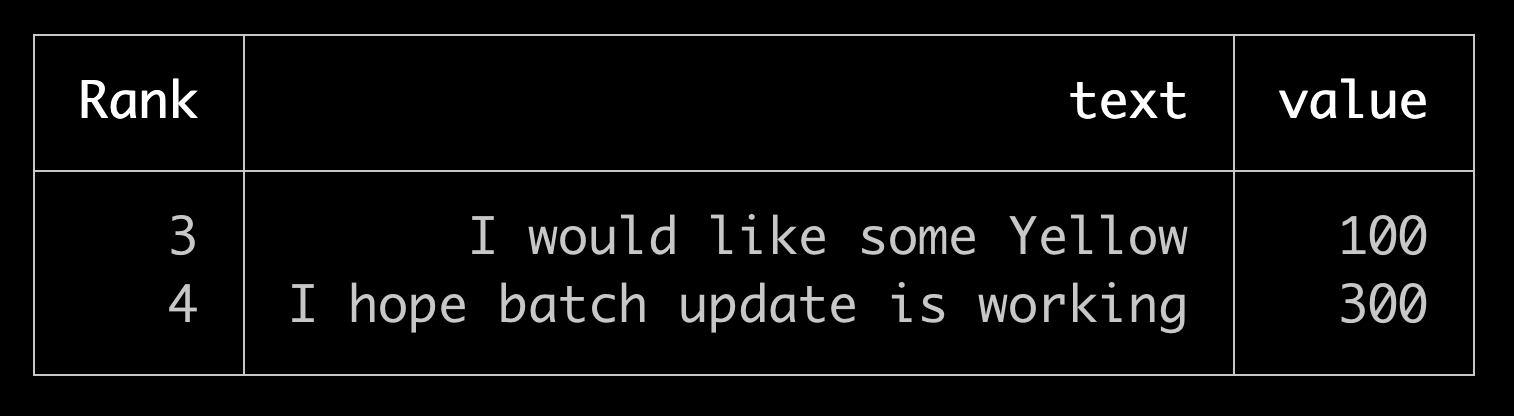
## Basic Example
|
||
|
||
```javascript
|
||
const { printTable } = require('console-table-printer');
|
||
|
||
//Create a table
|
||
const testCases = [
|
||
{ Rank: 3, text: 'I would like some Yellow', value: 100 },
|
||
{ Rank: 4, text: 'I hope batch update is working', value: 300 },
|
||
];
|
||
|
||
//print
|
||
printTable(testCases);
|
||
```
|
||
|
||
|
||
|
||
## 🚨🚨Announcement🚨🚨 Official Documentation is moved [Here](https://console-table.netlify.app/docs)
|
||
|
||
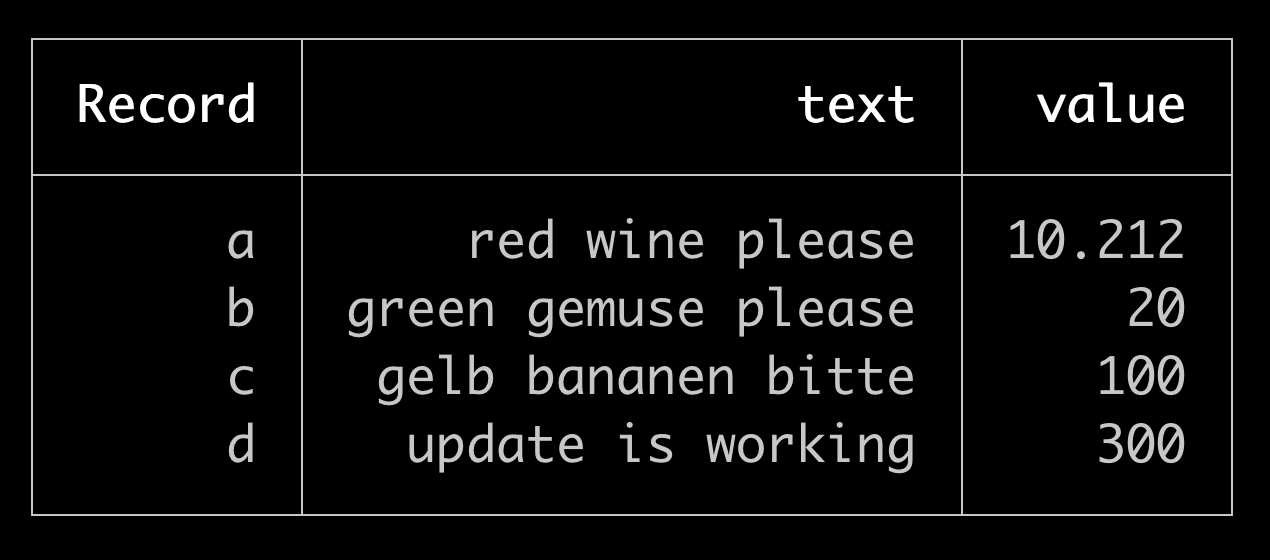
You can also create a Table instance and print it:
|
||
|
||
```javascript
|
||
const { Table } = require('console-table-printer');
|
||
|
||
//Create a table
|
||
const p = new Table();
|
||
|
||
// add rows with color
|
||
p.addRow({ Record: 'a', text: 'red wine please', value: 10.212 });
|
||
p.addRow({ Record: 'b', text: 'green gemuse please', value: 20.0 });
|
||
p.addRows([
|
||
// adding multiple rows are possible
|
||
{ Record: 'c', text: 'gelb bananen bitte', value: 100 },
|
||
{ Record: 'd', text: 'update is working', value: 300 },
|
||
]);
|
||
|
||
//print
|
||
p.printTable();
|
||
```
|
||
|
||
|
||
|
||
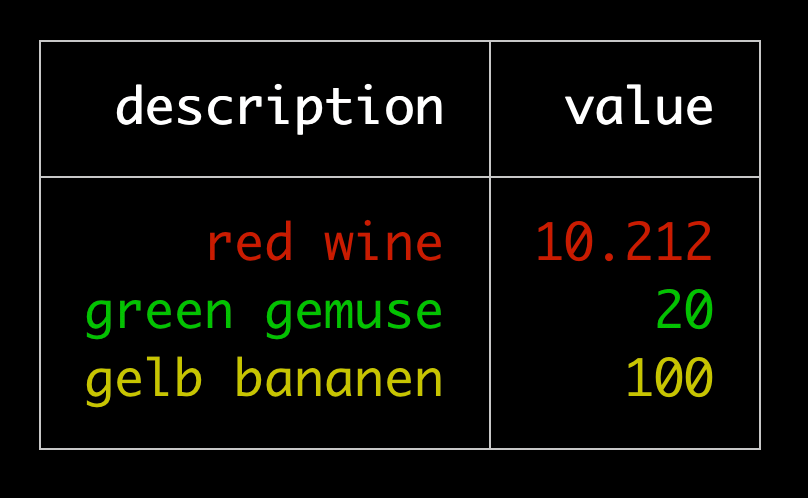
You can also put some color to your table like this:
|
||
|
||
```javascript
|
||
const p = new Table();
|
||
p.addRow({ description: 'red wine', value: 10.212 }, { color: 'red' });
|
||
p.addRow({ description: 'green gemuse', value: 20.0 }, { color: 'green' });
|
||
p.addRow({ description: 'gelb bananen', value: 100 }, { color: 'yellow' });
|
||
p.printTable();
|
||
```
|
||
|
||
|
||
|
||
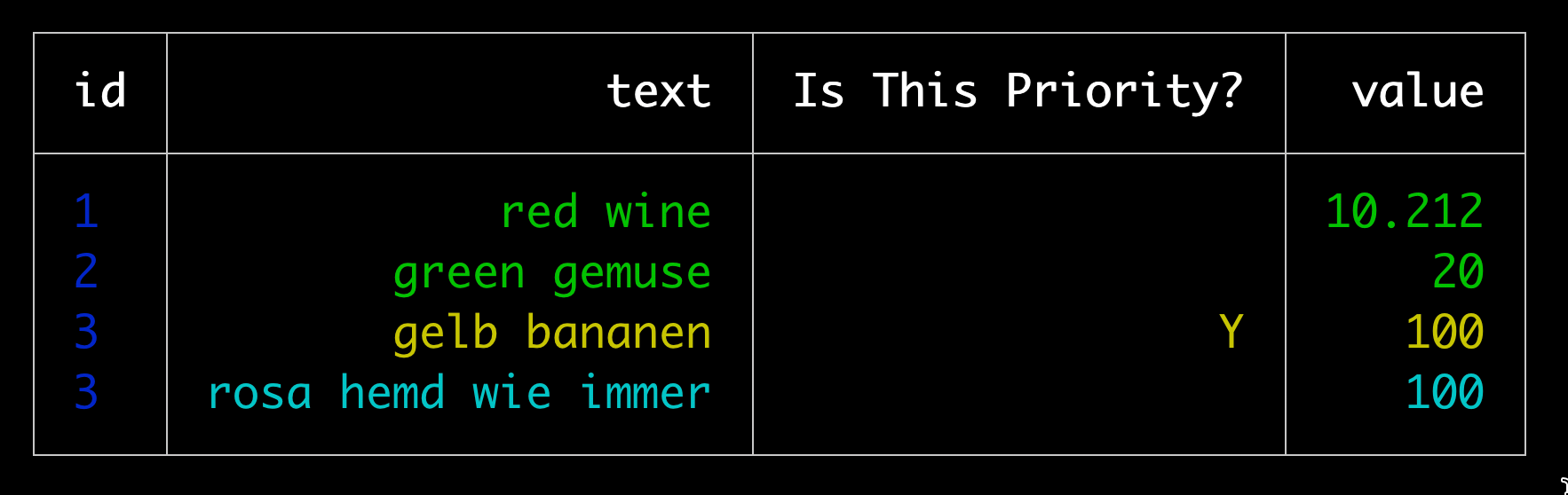
You can also put properties based on columns (color/alignment/title)
|
||
|
||
```javascript
|
||
const p = new Table({
|
||
columns: [
|
||
{ name: 'id', alignment: 'left', color: 'blue' }, // with alignment and color
|
||
{ name: 'text', alignment: 'right' },
|
||
{ name: 'is_priority_today', title: 'Is This Priority?' }, // with Title as separate Text
|
||
],
|
||
colorMap: {
|
||
custom_green: '\x1b[32m', // define customized color
|
||
},
|
||
});
|
||
|
||
p.addRow({ id: 1, text: 'red wine', value: 10.212 }, { color: 'green' });
|
||
p.addRow(
|
||
{ id: 2, text: 'green gemuse', value: 20.0 },
|
||
{ color: 'custom_green' } // your green
|
||
);
|
||
p.addRow(
|
||
{ id: 3, text: 'gelb bananen', value: 100, is_priority_today: 'Y' },
|
||
{ color: 'yellow' }
|
||
);
|
||
p.addRow({ id: 3, text: 'rosa hemd wie immer', value: 100 }, { color: 'cyan' });
|
||
|
||
p.printTable();
|
||
```
|
||
|
||
|
||
|
||
## CLI
|
||
|
||
There is also a CLI tool for printing Tables on Terminal directly [table-printer-cli](https://www.npmjs.com/package/table-printer-cli)
|
||
|
||
## Documentation
|
||
|
||
Official documentation has been moved here: [console-table-documentation](https://console-table.netlify.app)
|
||
|
||
### Table instance creation
|
||
|
||
3 ways to Table Instance creation:
|
||
|
||
1. Simplest way `new Table()`
|
||
|
||
2. Only with column names: `new Table(['column1', 'column2', 'column3'])`
|
||
|
||
3. Detailed way of creating table instance
|
||
|
||
```javascript
|
||
new Table({
|
||
title: 'Title of the Table', // A text showsup on top of table (optoinal)
|
||
columns: [
|
||
{ name: 'column1', alignment: 'left', color: 'red' }, // with alignment and color
|
||
{ name: 'column2', alignment: 'right', maxLen: 30 }, // lines bigger than this will be splitted in multiple lines
|
||
{ name: 'column3', title: 'Column3' }, // Title is what will be shown while printing, by default title = name
|
||
],
|
||
rows: [{ column1: 'row1' }, { column2: 'row2' }, { column3: 'row3' }],
|
||
sort: (row1, row2) => row2.column1 - row1.column1, // sorting order of rows (optional), this is normal js sort function for Array.sort
|
||
filter: (row) => row.column1 < 3, // filtering rows (optional)
|
||
enabledColumns: ['column1'], // array of columns that you want to see, all other will be ignored (optional)
|
||
disabledColumns: ['column2'], // array of columns that you DONT want to see, these will always be hidden
|
||
colorMap: {
|
||
custom_green: '\x1b[32m', // define customized color
|
||
},
|
||
charLength: {
|
||
'👋': 2,
|
||
'😅': 2,
|
||
}, // custom len of chars in console
|
||
});
|
||
```
|
||
|
||
### Functions
|
||
|
||
- `addRow(rowObjet, options)` adding single row. This can be chained
|
||
- `addRows(rowObjects, options)` adding multiple rows. array of row object. This case options will be applied to all the objects in row
|
||
- `addColumn(columnObject)` adding single column
|
||
- `addColumns(columnObjects)` adding multiple columns
|
||
- `printTable()` Prints the table on your console
|
||
|
||
### possible `color` values for rows
|
||
|
||
Check Docs: [color-vals](https://console-table.netlify.app/docs/doc-color)
|
||
|
||
Example usage: To Create a row of color blue
|
||
|
||
```js
|
||
table.addRow(rowObject, { color: 'blue' });
|
||
```
|
||
|
||
Example usage: To apply blue for all rows
|
||
|
||
```js
|
||
table.addRows(rowsArray, { color: 'blue' });
|
||
```
|
||
|
||
### possible `alignment` values for columns
|
||
|
||
Check Docs: [alignment-vals](https://console-table.netlify.app/docs/doc-alignment)
|
||
|
||
### Typescript Support
|
||
|
||
You can get color / alignment as types. Check Docs: [types-docs](https://console-table.netlify.app/docs/doc-typescript)
|
||
|
||
## License
|
||
|
||
[MIT](https://github.com/ayonious/console-table-printer/blob/master/LICENSE)
|